How to void bills in bulk
- In the Purchases menu, select Bills.
- Open the Awaiting Payment tab.
- Select the checkbox for each bill you want to void, then click Void.
- Click Continue to void [number] items.
Your user role decides whether you can delete or void bills at all. Xero also notes that voiding a bill could have tax implications, so check with your accountant or bookkeeper first.
You can't restore a deleted or voided bill, but you can copy it to a new bill. To find them, open the All tab, click Filter and tick Deleted & voided.
Why sales invoices are different
For sales invoices, Xero's help centre says: "You can't void awaiting payment invoices in bulk, you need to void them individually." Each one is opened, voided from its menu and confirmed.
Neither help article explains why the two lists differ. The request for bulk void on sales invoices has more than 250 votes on Xero's Product Ideas forum. In November 2025 Xero replied that it is "not a feature we have planned at this stage", and suggested its API to people with technical resources.
So to void a batch of sales invoices you can do it by hand, through the API, or with a browser extension. How to void multiple invoices in Xero compares the three.
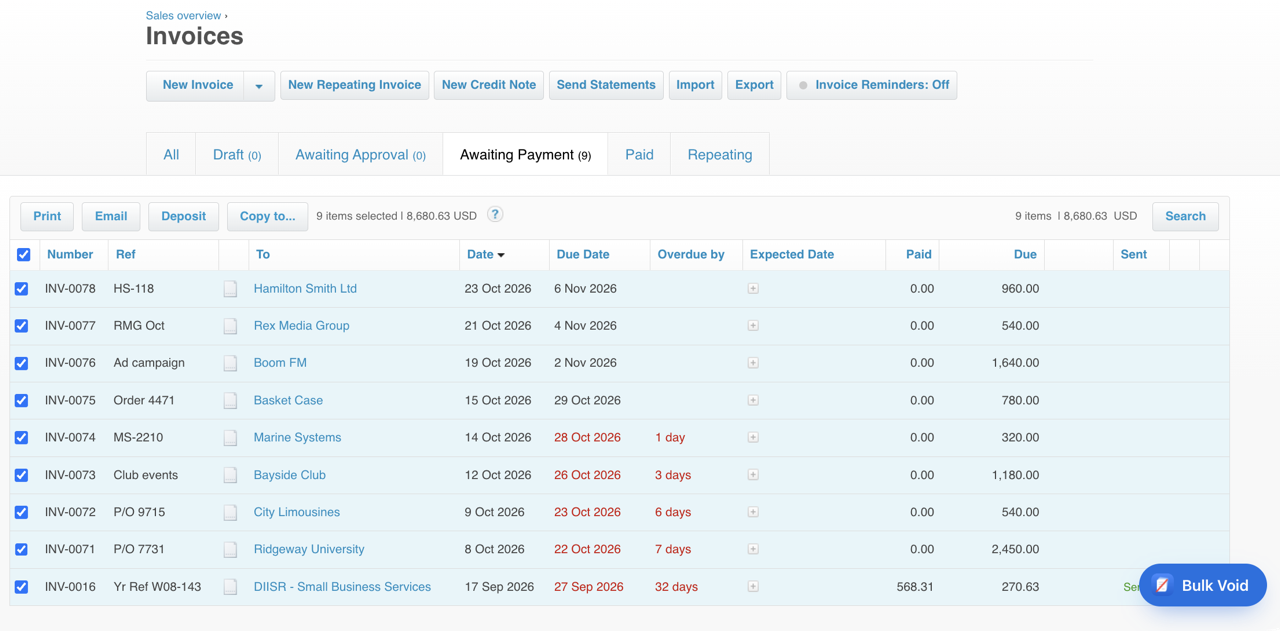
Bulk Void covers the sales invoice gap
Bulk Void for Xero is a Chrome extension for Awaiting Payment sales invoices only. You don't need it for bills: Xero already voids those in bulk.
- Saves a backup CSV of the batch before it starts.
- Shows a dry run and asks you to type the count to confirm.
- Voids the invoices one after another and ends with a report: voided, skipped, failed.
It's free for your first 5 invoices, then $29 per Xero organisation.
See how Bulk Void worksWhat works the same on both lists
Deleting drafts in bulk
On both lists, open the Draft or Awaiting Approval tab, tick the items and click Delete. One difference: an awaiting approval bill has to be deleted in the web version of Xero, not the app.
Approving in bulk
Bills are approved in bulk from the Draft tab. Sales invoices can be approved in bulk from the Draft or Awaiting Approval tab, and once approved you can email several at the same time. Xero's advice before a bulk approval: make sure the invoice details are correct, because you can only edit or void approved invoices one at a time.
No undo after a void
Voided invoices can't be reinstated or restored, and deleted or voided bills can't be restored either. On both lists you can copy a voided item to re-create it.
Export before you start
Both lists export to a CSV file, up to 500 transactions at a time. Export the tab before a bulk delete or void so you keep a record.
Paid bills and invoices
Neither list voids a paid item. Remove the payment first with Remove & Redo: open the paid or part-paid bill or invoice, click Less payment, then Options and Remove & Redo. The item goes back to Awaiting Payment.
On bills, you can only remove one payment from one bill at a time. Once the payments are off, the bills are back on the Awaiting Payment tab and you can void them together.
A payment deleted with Remove & Redo can't be restored. Its bank statement line stays in the bank account, so you can reconcile it with another invoice or bill.
Questions
Can you void bills in bulk in Xero?
Yes. In Purchases, Bills, open the Awaiting Payment tab, tick the bills, click Void, then click Continue to void. Paid bills need their payments removed first.
Can you void sales invoices in bulk in Xero?
No. Xero says awaiting payment invoices can't be voided in bulk and must be voided individually. Draft and awaiting approval invoices can be deleted in bulk.
Can you approve bills in bulk in Xero?
Yes. In Purchases, Bills, open the Draft tab, tick the bills, click Approve and confirm. Sales invoices can be approved in bulk from the Draft or Awaiting Approval tab.
Can a voided bill be restored?
No. Xero says you can't restore a deleted or voided bill, but you can copy it to a new bill.