Delete Draft or Awaiting Approval invoices in bulk
- In Xero, go to Sales, then Invoices.
- Open the Draft or Awaiting Approval tab.
- Tick the invoices you want to remove. The box in the header row selects every invoice on the page.
- Click Delete and confirm.
This is the cleanest fix after a bad import, if the invoices came in as drafts. Xero itself suggests importing invoices as drafts for this reason.
Void an Awaiting Payment invoice
Xero's help centre is direct about this: awaiting payment invoices can't be voided in bulk and have to be voided individually. For each invoice:
- Open the invoice.
- Click the More invoice options button (the three dots) and choose Void.
- Confirm with Void in the dialog.
A voided invoice stays in Xero with the status Voided, so you keep a record. It can't be reinstated or restored, so keep the invoice details somewhere before you start.
How to void many invoices at once
If an import or an integration created hundreds of approved invoices, voiding them one by one takes hours. You have three options.
1. Void them by hand
Free and safe, but slow: three clicks and a page load per invoice. Fine for a dozen invoices, painful for hundreds.
2. Use the Xero API
Xero points technical users to its API, where an approved invoice's status can be set to VOIDED. You need a developer, an app connection to your organisation and a script. Worth it if you have someone who can write and test that script.
3. Use a browser extension
Bulk Void for Xero is a Chrome extension that works on the Awaiting Payment invoice list. You tick the invoices; it does the rest.
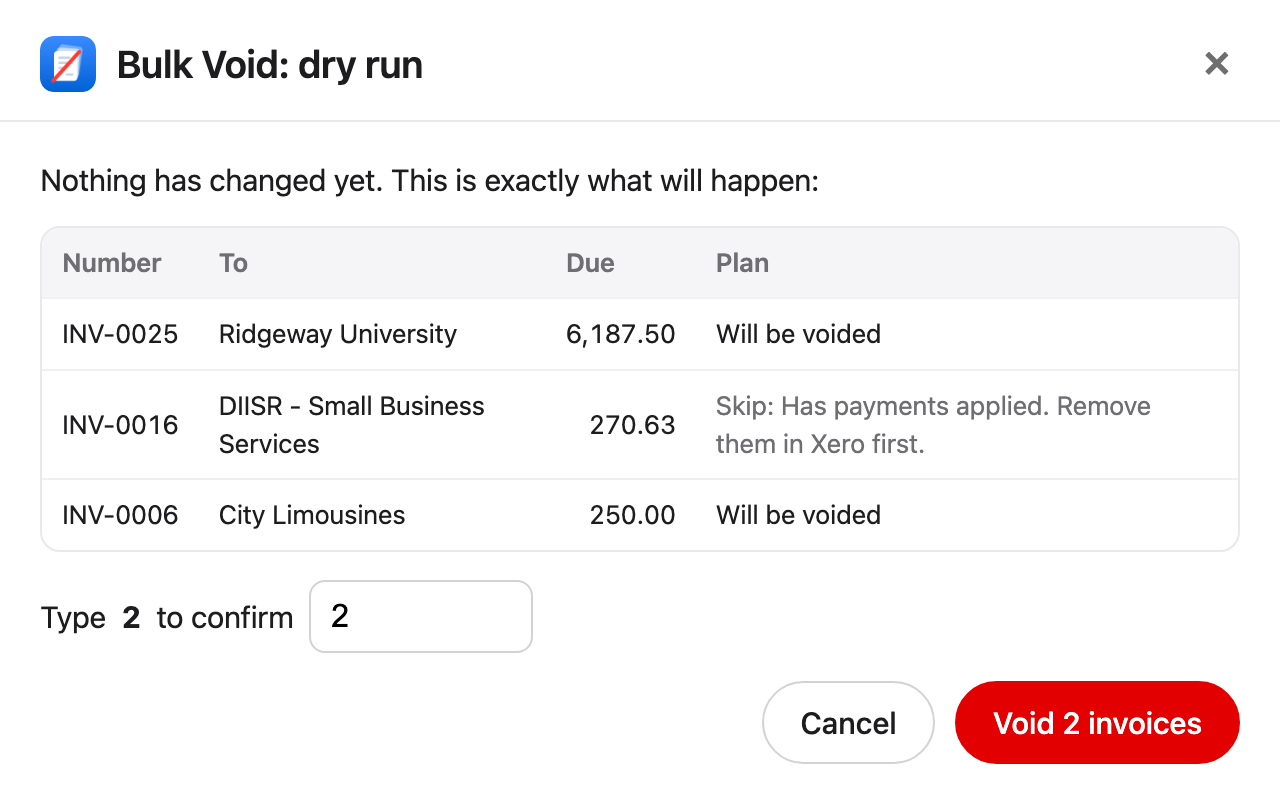
What Bulk Void does
- Saves a backup CSV of every selected invoice first.
- Shows a dry run, and skips invoices that have payments.
- Asks you to type the number of invoices to confirm.
- Voids them automatically, one after another, in your own Xero session. You don't click anything: keep the tab open and it finishes with a report.
It runs in your browser only. It doesn't connect to the Xero API or send invoice data anywhere. The free version voids 5 invoices; one licence covers one Xero organisation.
See how Bulk Void worksThe three options side by side
| Option | By hand | Xero API | Bulk Void |
|---|---|---|---|
| Setup | None | Developer, app connection and a script | Install a Chrome extension |
| Clicks per invoice | Three, plus a page load | None once the script works | None |
| Backup first | Up to you | Up to your script | Saved before it starts |
| Cost | Free | Developer time | 5 invoices free, then a one-time licence |
Before you void a batch
- Check the period. If the invoices fall in a period you've already filed or locked, talk to your accountant first.
- Remove payments first. Xero won't void an invoice with a payment or credit note applied.
- Keep a backup. Export the invoice list, or let your tool save one, because a void can't be undone.
- Tell your customers if the invoices were already sent to them.
Questions
Can you bulk delete invoices in Xero?
Yes, if they're Draft or Awaiting Approval. Approved invoices can only be voided.
Can you void multiple invoices at once in Xero?
Not in Xero itself. Bills can be voided in bulk, but sales invoices can't. Use the API or a browser extension for a batch.
Can a voided invoice be restored?
No. Recreate it from your backup if you need it again.
Is Xero adding bulk void for invoices?
The request on Xero's Product Ideas forum has more than 250 votes. In November 2025 Xero replied that it is "not a feature we have planned at this stage". See the Product Ideas thread.